
UONO Scratch
Jackpot Guide.
Explore the Hourly, Daily and My Prize views shown in UONO Scratch, then check current participation details inside JAIHO PLAY.
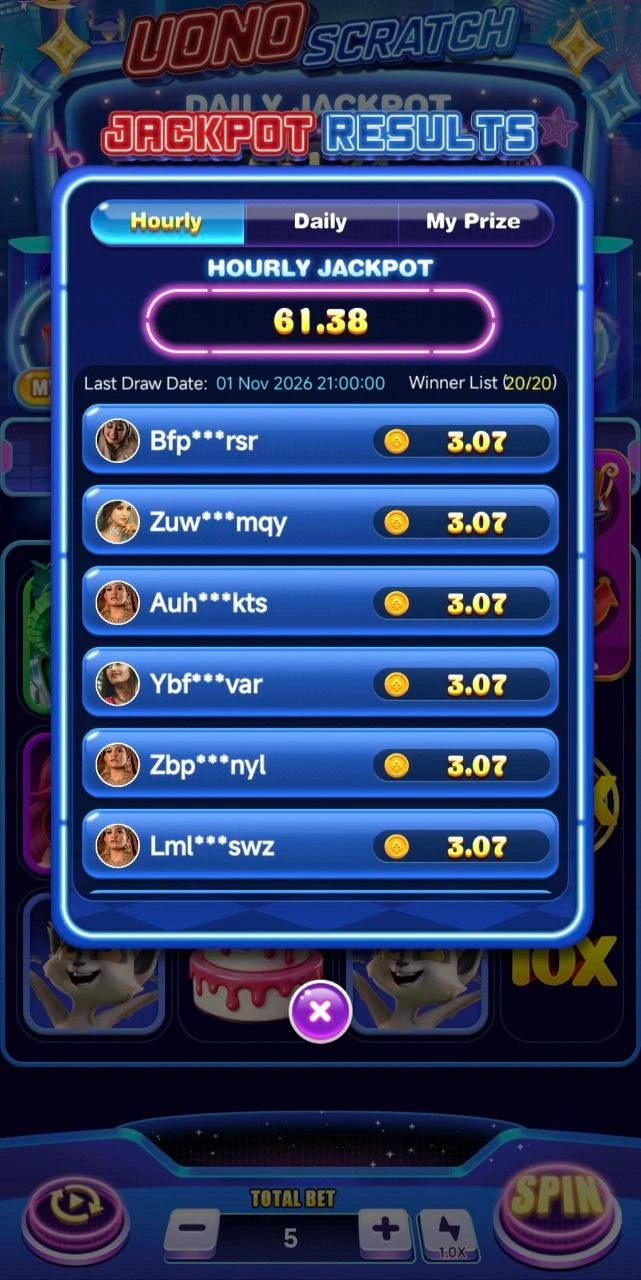
Find the draw.
Review the result.
The results panel shown here has three tabs: Hourly, Daily and My Prize. The selected Hourly tab shows a last-draw date and a winner list.
- Hourly / Daily: explore the corresponding jackpot information and published results in the app.
- My Prize: open your own prize view and check any award details shown there.
- Current details: use the in-app countdown, rules and amounts for the present draw.
This is a historical screen capture. Its amounts, player entries and timestamp do not describe a current or upcoming draw.
The details that matter
Jackpot participation and scratch-card line results are distinct parts of the game. Read both sets of rules to understand what is being awarded and when.
- Open the jackpot information. Check the app’s current draw name, schedule and time zone.
- Review entry conditions. Confirm which rounds or stakes qualify and whether any account or location restrictions apply.
- Check the displayed pool. Use the current in-app amount rather than an illustration or an older promotional image.
- Read the award rules. Confirm how winners are selected, how awards are credited and any claim conditions.
Keep the same limits.
A larger pool does not make a result certain. Jackpot participation remains chance-based. Avoid increasing your spending to chase a draw or recover earlier losses.
Read responsible-play guidance →
Find UONO Scratch
in JAIHO PLAY.
Get the Android app, find UONO Scratch in the game lobby and review the current rules before playing.